Where Short-Form Video Audio Actually Comes From (and Why It Sounds Compressed)
People notice that audio on short-form video platforms sounds flat, and usually blame the platform. That is half right, and the interesting half is the other one.
The platform is only one stage in a chain of encoders, and by the time a sound reaches your earphones it has typically been compressed and re-compressed three separate times. Each stage works from what the previous stage left behind, not from the original recording.
Understanding that chain explains a lot — why some clips sound noticeably worse than others, why the same audio sounds better in one app than another, and why buying better earphones frequently changes less than people expect.
The chain
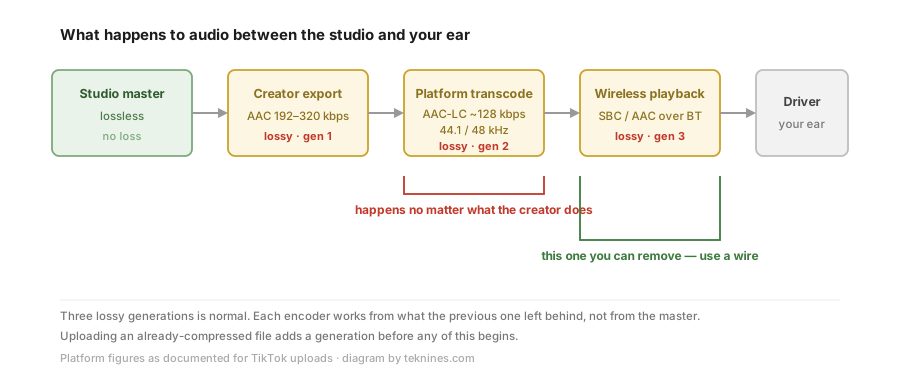
Stage 1 — the master
Whatever the sound started as. A studio recording, a voice memo, a game capture. Lossless if it came from a music library; frequently already compressed if it came from somewhere else.
Stage 2 — the creator’s export
When a creator exports a video, the audio is encoded. Guidance for uploading to TikTok generally recommends AAC at 192–320 kbps, 44.1 or 48 kHz, and that recommendation exists for a specific reason: it gives the platform’s own encoder clean material to work from.
This is the first lossy generation, and it is the one the creator controls.
Stage 3 — the platform transcode
This is the stage most people mean when they say “the platform ruined it,” and it is unavoidable. Uploads are transcoded server-side into several renditions. TikTok’s output is documented as AAC-LC at 44.1 or 48 kHz, typically capped around 128 kbps stereo for the high-quality variant.
Two consequences:
- 128 kbps AAC is not bad. It sits in the range where, as the compression piece sets out, many listeners cannot reliably pick it out in blind conditions on typical material.
- But it is a second generation. The encoder is not looking at the master. It is looking at whatever the creator’s export preserved. If that export was already a low-bitrate file, this stage compounds the damage rather than merely adding to it.
This is why the “upload at a high bitrate” advice matters even though the platform will re-compress everything anyway. You are not trying to keep your bitrate. You are trying to hand the platform’s encoder something clean.
Stage 4 — Bluetooth
Almost everyone watches on a phone, and most phones no longer have a headphone jack. So the audio is decoded, then encoded a third time for the wireless link, in SBC or AAC.
This stage is invisible in every discussion of platform audio quality, and it is the one stage you can simply delete by using a wire.
Stage 5 — the driver
Only here does the earphone finally get involved.
Which stages actually cost you something
Not equally.
| Stage | Typical cost | Can you change it? |
|---|---|---|
| Creator export | Small if done well, large if the source was already compressed | Only if you are the creator |
| Platform transcode | Moderate, and unavoidable | No |
| Bluetooth | Small to moderate, depends on codec and connection quality | Yes — use a wire |
| Earphone | Changes what you notice, not what is there | Yes, but see below |
The honest summary: the platform stage is the one everyone blames and the one nobody can change. The Bluetooth stage is smaller but entirely removable, and almost nobody thinks about it.
Why a “better” earphone often disappoints here
An earphone cannot restore information that three encoders removed. What it changes is how obvious the damage is.
A warm, soft-topped earphone — the Munitio NINES being a clear example, or most consumer earbuds — masks codec artefacts, because those artefacts live mostly in the treble. A revealing earphone does the opposite: it shows you every smeared cymbal and every hollow reverb tail that stages 2 through 4 introduced.
Which means that on short-form video specifically, upgrading to a more revealing earphone can make things sound worse. That is not a fault in the earphone. It is the earphone doing its job on material that does not deserve it.
This is a genuinely useful buying criterion, and it runs against the usual advice: for this material, the earphone that measures worse is often the one you would rather be wearing.
What actually helps
In order of effect:
- Use a wire when you can. It removes an entire lossy stage and, as a bonus, removes the lip-sync delay discussed in the next article.
- Get your seal right. A leaking earphone loses bass, and thin bass makes compressed audio sound far worse than it is. The fit guide covers this and it costs nothing.
- Match the earphone to the material. For compressed platform audio, a forgiving tuning is genuinely the better tool.
- If you are the creator: export at a high bitrate, from the least-compressed source you have, and never re-upload a file that has already been through the platform once. That last one is the single most common avoidable mistake — and it is the reason a re-posted clip sounds worse than the original every time.
The part that surprises people
There is nothing exotic happening. No platform is secretly degrading audio to save money in some dramatic way; 128 kbps AAC is a reasonable engineering decision for billions of streams.
What degrades the sound is that the process happens repeatedly, to material that has already been through it, and that the last stage of all — the wireless link — is one people add voluntarily and never count.